TRON energy API
Five requests take you from a price to a delegated order: estimate, quote, order, poll, webhook. Every request is HMAC-signed, every order carries your own idempotency key, and the contract is published as OpenAPI rather than described in prose.
Base URL https://api.tenergy.me/v1 on mainnet and https://api-nile.tenergy.me/v1 on Nile, with separate keys, a separate account and a separate ledger.
- OpenAPI
- HMAC
- Webhooks
- TS SDK
- Python SDK
- MCP server
- Nile testnet
Estimate an order — no key needed
curl -sG https://api-nile.tenergy.me/v1/estimate \
  -d resource=energy -d amount=65000 -d tier=1h
const query = new URLSearchParams({ resource: "energy", amount: "65000", tier: "1h" });
const res = await fetch(`https://api-nile.tenergy.me/v1/estimate?${query}`);
const estimate = await res.json();
// integers in SUN: 1 TRX = 1,000,000 SUN
console.log(estimate.price_sun_per_unit, "SUN per energy");
console.log(estimate.total_amount_sun / 1e6, "TRX for 65,000 energy, 1 hour");import json, urllib.parse, urllib.request
query = urllib.parse.urlencode({"resource": "energy", "amount": 65000, "tier": "1h"})
with urllib.request.urlopen(f"https://api-nile.tenergy.me/v1/estimate?{query}") as res:
estimate = json.load(res)
# integers in SUN: 1 TRX = 1,000,000 SUN
print(estimate["price_sun_per_unit"], "SUN per energy")
print(estimate["total_amount_sun"] / 1e6, "TRX for 65,000 energy, 1 hour")Press Run to see the live answer.
Three ways to buy
Same energy, same delegation on chain — the route depends on who is buying and how often.
| How | What you need | Account | Price |
|---|---|---|---|
| Direct transfer | A TRON wallet: send TRX to the address in the order form | Not needed | Your TRX ÷ the live price, from 64,000 energy |
| Dashboard | Sign in with your wallet, top up the balance | Wallet sign-in | The live price |
| API | An API key and a topped-up balance | Wallet sign-in, API key | The live price |
SDKs and packages
TypeScript and Python SDKs @tenergy/sdk · tenergy
One typed method per operation, in both languages.
- Signs every request with a fresh timestamp, retries included
- Retries GET and DELETE only; a create is sent once
- waitForOrder / wait_for_order and webhook verification built in
Published on npm and PyPI as a beta. Without a dependency, the signing helper in the quickstart does the same in cURL, TypeScript or Python.
Five lines to your first order
import { TenergyClient } from "@tenergy/sdk";

const tenergy = new TenergyClient({
  baseUrl: "https://api-nile.tenergy.me/v1",
  apiKey: process.env.TENERGY_KEY!,
  apiSecret: process.env.TENERGY_SECRET!,
});

const quote = await tenergy.createQuote({
  resource: "energy", amount: 65_000, tier: "1h", receiver,
});
const order = await tenergy.createOrder({
  quote_id: quote.id, client_order_id: `payout-${invoiceId}`,
});
const done = await tenergy.waitForOrder(order.id);
if (done.partial) await reconcile(done.delivered_amount, done.refunded_amount_sun);
import os
from tenergy import Client
tenergy = Client(
os.environ["TENERGY_KEY"], os.environ["TENERGY_SECRET"], network="nile",
)
quote = tenergy.create_quote({
"resource": "energy", "amount": 65_000,
"tier": "1h", "receiver": receiver,
})
order = tenergy.create_order({
"quote_id": quote["id"], "client_order_id": f"payout-{invoice_id}",
})
done = tenergy.wait_for_order(order["id"])
if done.get("partial"):
reconcile(done["delivered_amount"], done["refunded_amount_sun"])| Package | What it is | Guide |
|---|---|---|
| @tenergy/sdk | TypeScript, typed, generated from the contract · beta on npm | SDK guide |
| tenergy | Python, sync and async clients, webhook checks · beta on PyPI | SDK guide |
| mcp.tenergy.me | Hosted MCP server for agents · nothing to install | MCP |
Already on another energy service? No package needed: keep your API and change the base URL. Compatible APIs →
Docs you can read in any order
Three columns, search on Ctrl K, code in cURL, TypeScript and Python, the full API reference — and every page as markdown at its own path plus .md.
Open the docs →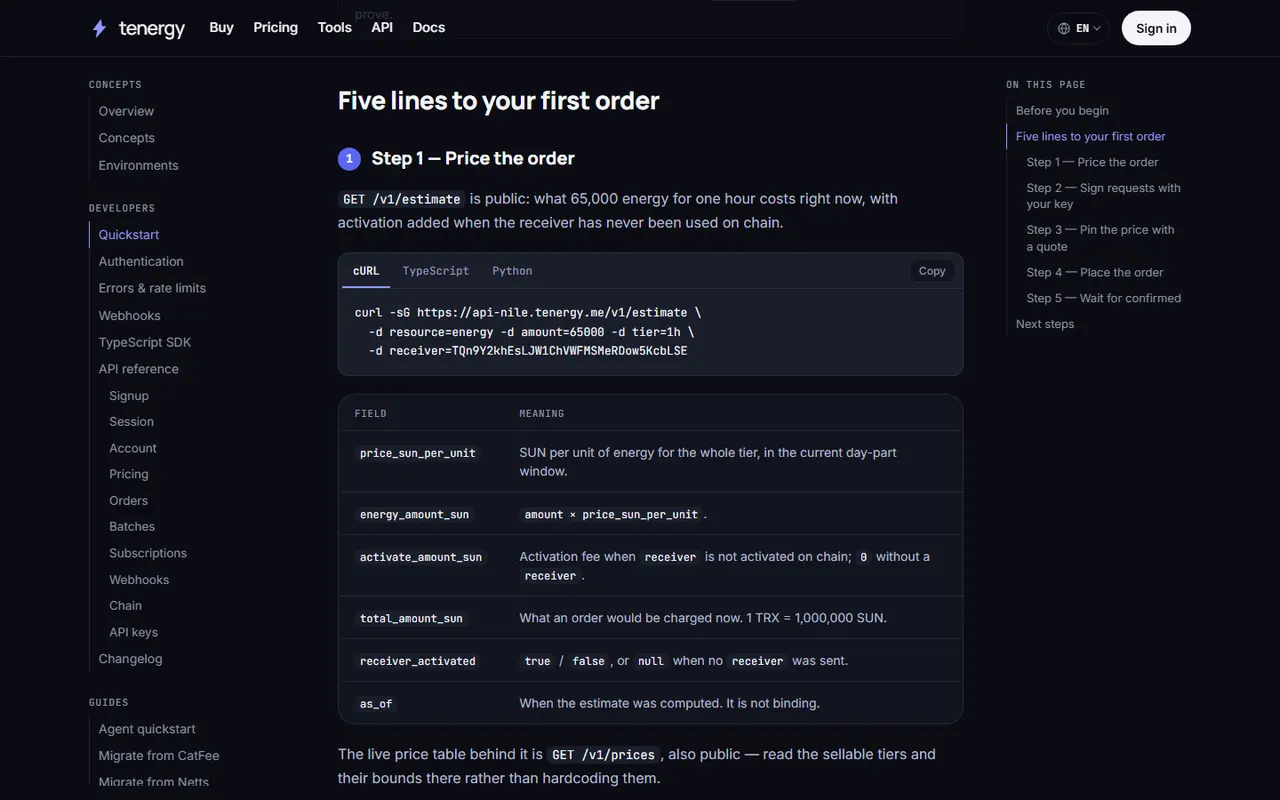
Machine-readable
| Document | What it is for |
|---|---|
| /openapi.yaml | The full API contract. Generate a client from it. |
| /llms.txt | A curated map for an agent: what to read, in the order that gets it to a purchase. |
| /llms-full.txt | The whole corpus as one markdown file, for agents that prefer one fetch to twenty. |
| /.well-known/quickstart.json | The purchase flow as JSON: endpoints, auth, units, which steps need a human. |
| /docs/agent-quickstart | The operator prompt to paste into your own agent, with a copy button. |
| /docs/quickstart.md | Every docs page as markdown: add .md to its path. |
FAQ
How is a request authenticated?
Three headers: X-API-KEY, X-API-TIMESTAMP and X-API-SIGN, where the signature is base64(HMAC-SHA256(secret, timestamp + method + path + query + body)). The clock tolerance is five seconds.
Which permissions does a new key get?
Exactly the ones you choose. scopes is required, there is no default set and no preselected checkbox anywhere — in the contract, the dashboard or the agent flow.
Polling or webhooks?
Webhooks where you have a public HTTPS endpoint: we sign them and you verify. Polling GET /v1/orders/{id} is documented as the supported fallback, because many agent runtimes have no public URL.
Didn't find your answer? Ask us on Telegram at @tenergymebot or at support@tenergy.me and we'll add it here.